

Building your first AI agent in 2026 is not the same as calling an LLM API. While a standard LLM call is a static request-response cycle, an agent has the ability to use tools, search the web, reason through failures, and iterate on its own output. For backend engineers, this distinction matters: agents are software systems with observable state, not magic black boxes.
This tutorial walks through a complete, production-minded implementation of a ReAct (Reasoning and Acting) agent using free tools – Groq for fast LLM inference and DuckDuckGo for web search – and then compares the result against Anthropic’s Claude API. By the end, you will have a working agent, a clear understanding of the ReAct loop, and a provider-agnostic architecture you can extend for real projects.
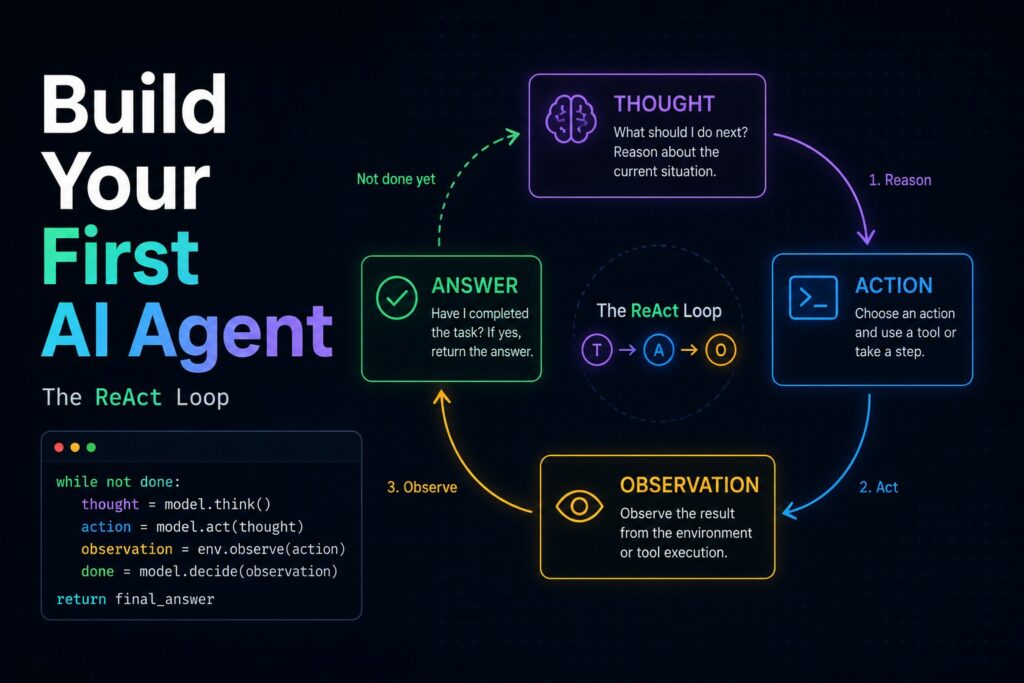
What Is a ReAct First AI Agent and Why Does It Matter
The ReAct pattern is the foundation of most modern first AI agents. Rather than generating a single response, the model follows a loop: generate a Thought, take an Action (call a tool), observe the Result, and repeat until the task is complete. This loop is what allows an agent to recover from bad search results, retry with a broader query, or chain multiple tools together.
For backend engineers, this is familiar territory. The ReAct loop is essentially a state machine with an LLM as the decision engine. Understanding it at this level – rather than trusting a framework to hide it – is what separates robust production agents from brittle demo scripts.
Project Setup
This first AI agent tutorial uses a minimal, reproducible structure. All dependencies are managed with uv, which handles both Python version installation and package resolution without requiring a system Python.
Dependencies (requirements.txt):
langchain
langchain-groq
duckduckgo-search
langchain-community
python-dotenv
anthropic
Install and run:
uv venv
uv pip install -r requirements.txt
Create a .env file with your API keys. Groq offers a free tier with no credit card required – sign up at console.groq.com and generate a key in under two minutes:
GROQ_API_KEY=your_groq_key
ANTHROPIC_API_KEY=your_anthropic_key  # optional, for comparison section
Building the Custom Search Tool
The first real engineering decision in this first AI agent tutorial is how to handle web search. The standard DuckDuckGoSearchRun wrapper from langchain-community throws a ModuleNotFoundError for a legacy ddgs package in current environments. Rather than downgrading dependencies – which introduces security risks – the better approach is to implement a custom tool using the @tool decorator directly against the modern DDGS API:
from langchain.tools import tool
from duckduckgo_search import DDGS

@tool
def search(query: str) -> str:
    """Searches the web for current information about a topic using DuckDuckGo."""
    try:
        with DDGS() as ddgs:
            results = list(ddgs.text(query, max_results=5))
            formatted = [f"Title: {r['title']}\nSnippet: {r['body']}" for r in results]
            return "\n\n".join(formatted)
    except Exception as e:
        return f"Error: {str(e)}"
This approach has two advantages: it uses the current API directly, and it gives full control over the output format the agent receives – which directly affects how well the model can parse and reason over results.
A second tool handles saving output to disk:
@tool
def save_to_file(content: str, filename: str = "output.txt") -> str:
    """Saves the provided content to a local file."""
    with open(filename, "w") as f:
        f.write(content)
    return f"Saved to {filename}"
Handling Model Deprecation
One of the most important practical lessons in any first AI agent tutorial is that models are not permanent infrastructure. During implementation, the initial model choice – llama3-8b-8192 on Groq – returned an immediate 400 Bad Request because the model had been decommissioned. This is a routine occurrence in AI engineering and needs to be handled architecturally, not reactively.
The solution is a provider-agnostic LLM initialization layer. By abstracting the model behind a single factory function, swapping providers becomes a one-line change:
import os
from langchain_groq import ChatGroq
from langchain_anthropic import ChatAnthropic

def get_llm(provider: str = "groq"):
    if provider == "groq":
        return ChatGroq(
            model="llama-3.3-70b-versatile",  # current stable model
            api_key=os.getenv("GROQ_API_KEY")
        )
    elif provider == "claude":
        return ChatAnthropic(
            model="claude-haiku-20240307",
            api_key=os.getenv("ANTHROPIC_API_KEY")
        )
llama-3.3-70b-versatile is the recommended Groq model for ReAct agents – it handles the structured Thought/Action/Observation format with significantly higher accuracy than smaller models.
Assembling the ReAct Agent
With tools and the LLM abstracted, the agent assembly is straightforward using LangChain’s create_react_agent and a standard ReAct prompt template:
import logging
from langchain import hub
from langchain.agents import AgentExecutor, create_react_agent
from dotenv import load_dotenv

load_dotenv()
logging.basicConfig(level=logging.INFO, format="%(asctime)s - %(message)s")

def run_agent(topic: str, provider: str = "groq"):
    llm = get_llm(provider)
    tools = [search, save_to_file]
    prompt = hub.pull("hwchase17/react")

    agent = create_react_agent(llm, tools, prompt)
    executor = AgentExecutor(agent=agent, tools=tools, verbose=True, max_iterations=6)

    logging.info(f"Starting agent | provider={provider} | topic={topic}")
    result = executor.invoke({
        "input": f"Research the topic '{topic}', summarize the key findings in 5 bullet points, and save the result to output_{provider}.txt"
    })
    logging.info(f"Agent completed | output_keys={list(result.keys())}")
    return result
Setting verbose=True on the AgentExecutor is non-negotiable for debugging. It exposes the full internal monologue – every Thought, every Action call, every Observation – directly to the terminal. When an agent gets stuck in a loop or fails to parse a tool’s output, the verbose log is the only reliable way to identify whether the issue is in the prompt, the tool description, or the model’s reasoning.
Making the Agent Observable
The biggest criticism of AI agents is that they are black boxes. The fix is to treat them like any other backend process: instrument everything.
With verbose=True and Python’s standard logging module, the agent becomes fully traceable. During a test run on the topic "latest developments in AI agents 2025", the logs revealed the agent initially receiving sparse results and then intelligently retrying with a broader query. Without this visibility, the natural assumption would be that the search tool was broken – when in fact the agent was navigating a sparse data environment correctly.
Key log events to capture:
- Agent start: provider, topic, timestamp
- Each tool call: tool name, input query
- Each tool result: character count, whether results were found
- Agent completion: output file path, total iterations used
This level of observability transforms debugging from guesswork into a traceable, reproducible process.
Groq vs. Claude: A Direct Comparison
For development and prototyping, Groq is the right default – it is fast, free, and sufficient. The only downside was frequent 429 errors, because the rate limits are not very high. For production use cases where output quality and instruction adherence are critical, Claude Haiku offers good consistency, but at a (very low) cost. The provider-agnostic architecture makes this a runtime decision, not an architectural one.
Running the Agent
# Run with Groq (default)
python agent.py "latest developments in AI agents 2025" groq

# Run with Claude for comparison
python agent.py "latest developments in AI agents 2025" anthropic
Both runs produce output files (output_groq.txt and output_claude.txt) for direct comparison. The terminal shows the full ReAct loop for each.
Key Takeaways
Building a working first AI agent from this tutorial reveals that the hard parts are not the AI – they are the engineering around it:
- Custom tools beat broken wrappers. When a community integration fails, implementing directly against the source API is faster and more reliable than downgrading.
- Models deprecate without warning. Abstract your LLM initialization from day one so a model change is a one-line fix.
- Verbose logging is mandatory. An agent without observable state is untestable. Treat every tool call as a loggable event.
- Provider lock-in is an architecture mistake. The same agent code running on Groq and Claude is proof that the abstraction is correct.
This AI agent tutorial is a starting point, not a production blueprint. The natural next step is adding a task queue (Redis + Celery or SQS) for async agent runs, and an observability layer (Langfuse or LangSmith) for per-request quality and cost tracking across many invocations.
You can see the sample project in a GitHub repository.