This article dives into the world of free AI image generation, exploring the best free tools available online. With the rise of AI-generated content, it’s become easier than ever to create stunning images without needing to be a professional artist. But with so many options, it can be tough to know where to start.
In this article, we’ll be comparing five popular image generation tools: ChatGPT, Microsoft Copilot, Gemini, Grok, and Hugging Face. We’ll take a closer look at their free tiers, as well as the quality of the images they produce. Whether you’re a marketer, designer or simply a curious user, this guide will compare the free tiers of these tools and also show generated images for the same prompt.
Each of the tools mentioned above has its own strengths and weaknesses, making it essential to understand their pros and cons before making a decision. From the level of customization to the level of control, every tool is different and the right one for you will depend on your specific use case.
To put each tool to the test, we’ll be using the same prompt and seeing what each service creates. The prompt for this article will be:
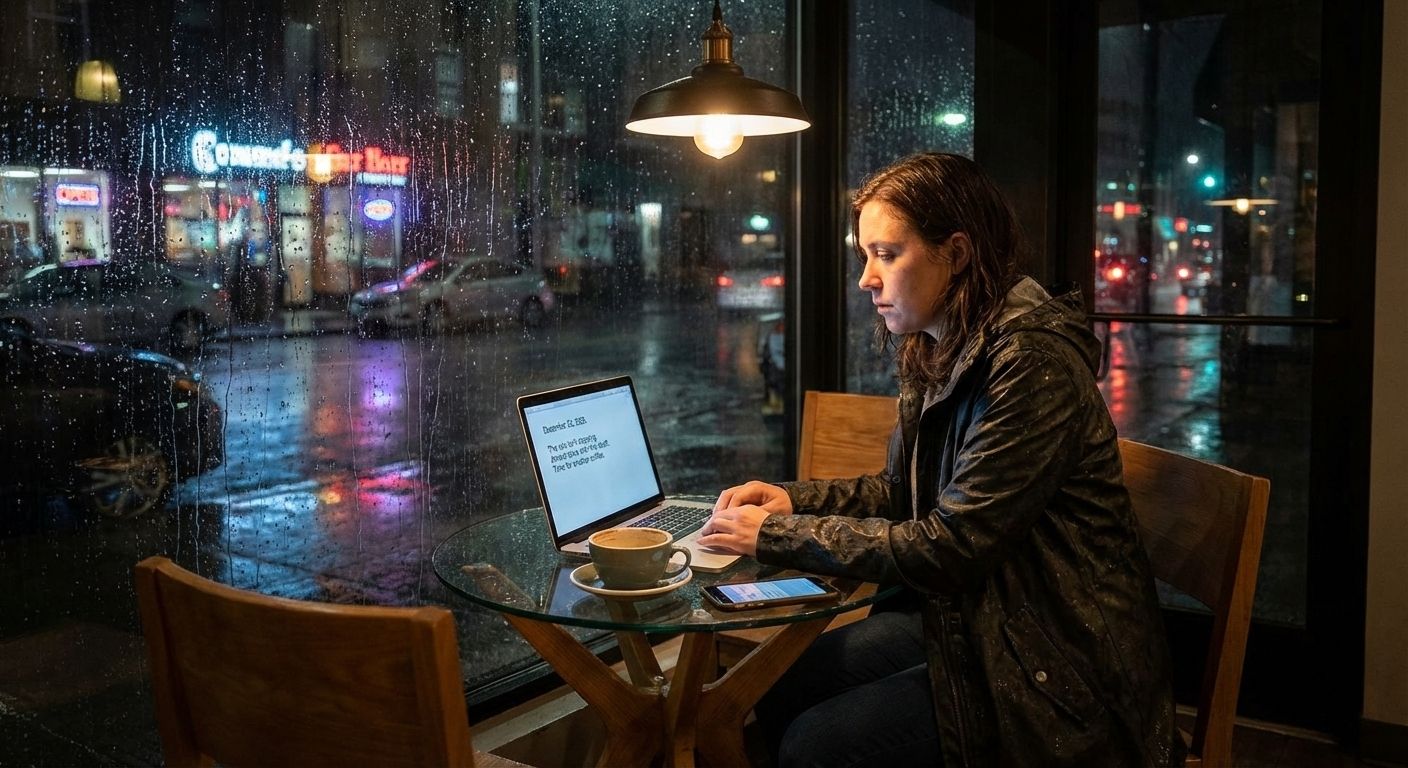
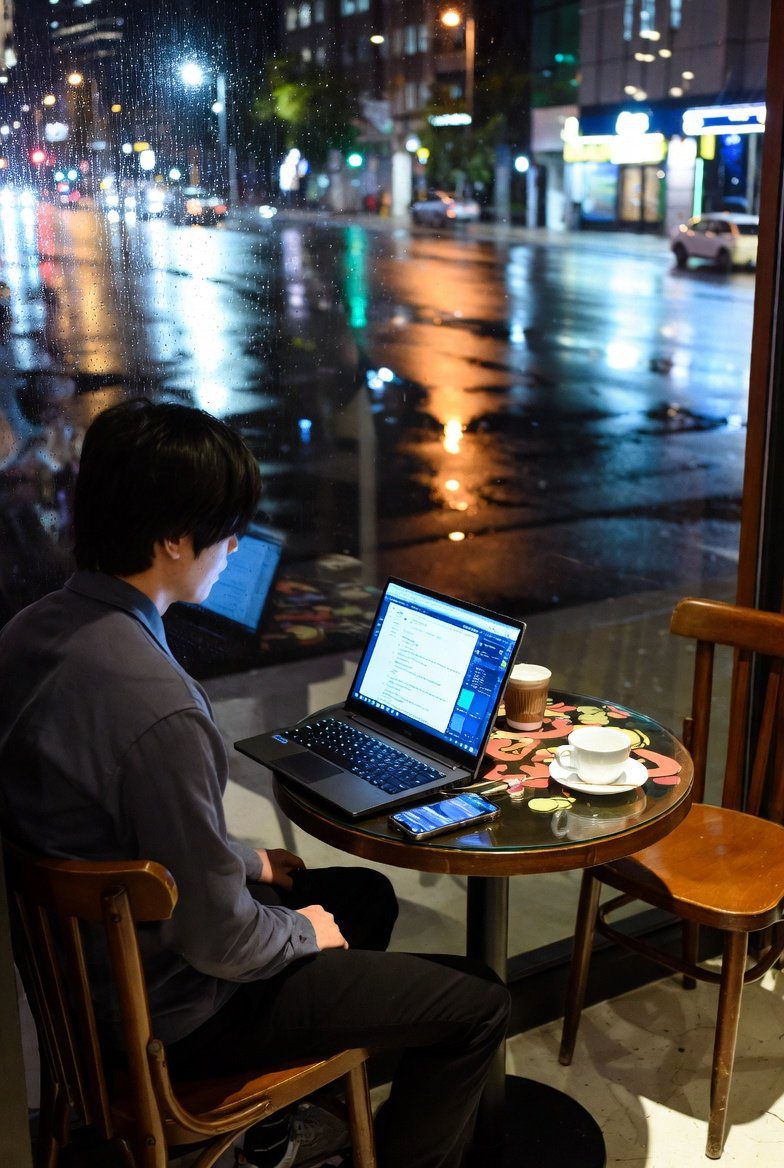
“Generate a realistic image of a person sitting alone at a small café table at night during rain. The person sits on a wooden chair. On the designed glass table are a laptop with readable text on the screen, a coffee cup and a smartphone showing notifications. Outside the window, wet streets reflect city lights. Lighting should be realistic, reflections accurate, and objects proportionally correct. The mood should feel calm, slightly tired, but focused.”
From the style and tone to the level of detail, we’ll be able to see the differences of the generated images side by side. This will give you a firsthand look at what to expect from each tool, helping you make an informed decision about which one to use.
In the following sections, we’ll delve into the details of each tool, comparing their free tiers and image quality. Whether you’re looking for a tool to create images for social media, marketing or design, today is the golden age for anyone who wants to create visual content.
ChatGPT
As the pioneer within generative AI landscape, ChatGPT offers high-quality image generation via DALL-E with around 40 images/month on its free plan. The limits mentioned in this article will be only rough estimates, as they change frequently and there aren’t some publicly know numbers.
Excellent prompt understanding and strong realism are advantages of using ChatGPT. Its ability to comprehend and interpret user instructions enables it to produce high-quality images that meet specific requirements. This is particularly evident in its use of DALL-E, a powerful model that can generate images in wide array of styles.
The free plan’s limitations are mainly about low number of generations. Users are restricted to generating around 40 images per month, which may not be sufficient for those who require even a slightly higher volume of image generation. As a consequence, the editing on the free plan is limited, making it difficult to refine and perfect the generated images.
Despite these limitations, ChatGPT’s free plan still offers a great service for users who require a basic level of image generation. The ability to describe what should be changed in an image is a useful feature, even if the results may not always meet expectations. It’s also worth noting that the free plan is an excellent starting point for users who just want to test the waters.
In terms of image quality, the output is impressive, with clear and detailed images that can be used in a variety of contexts. The strong realism and excellent prompt understanding make it an feasible option for users who require high-quality images.
However, those who require a high volume of image generation or more advanced editing tools may need to consider upgrading to a paid plan or using another tool.
Here is the result of ChatGPT image generation for our prompt described in the intro section:

Microsoft Copilot
Thanks to the cooperation of OpenAI and Microsoft, Copilot uses DALL-E-based models and offers around 15 fast images daily on its free account. This generous free quota and good quality of images are significant advantages of using Copilot.
Whether you’re a content creator or just someone who loves experimenting with AI, Copilot’s features will likely fulfill all your needs. It is capable of producing realistic and unique images, making it a great tool for various applications. Copilot is a versatile tool that can help you with many areas of image types.
However, it’s essential to note that Copilot’s generation speed can be slower compared to other services. This might be a drawback for those who need to work quickly or produce a large number of images. Additionally, the limited control over the generation process can be frustrating for some users.
One of the most significant benefits of Copilot is its ease of use. Easily integrated in Copilot interface, anyone can quickly get started and begin generating images. The user-friendly interface and intuitive controls make it easy to navigate and experiment with different settings.
Overall, Microsoft Copilot is a powerful tool that can help you produce high-quality images. While it’s not perfect, its advantages far outweigh its drawbacks, making it a great choice for those looking to explore the world of AI-generated images.
Here is the resulting image generated by Copilot:

Google Gemini
While OpenAI and Copilot have basically the same models (and approach) to generating images, Google Gemini offers a little different take. This powerful tool offers top-notch text-to-image accuracy as well, making it a great choice for generating stunning visuals, especially in the Google ecosystem.
But one of the standout features of Google Gemini is its impressive photo editing capabilities. You can achieve professional-grade results with ease, thanks to its ability to understand and execute even complex textual descriptions of desired edits. It’s no wonder some people are calling it the “Photoshop killer”! Whether you’re looking to touch up a single image or create an entire collection, Gemini has got you covered.
It also offers a decent free tier, with limits that are more than sufficient for casual users. However, it’s worth noting that quotas can change frequently and regional differences may apply. If you’re a heavy user, you may find that the free tier isn’t enough to meet your needs.
Despite this, Google Gemini remains an excellent choice for anyone looking to create and especially edit images. Its seamless integration with other Google tools and services makes it a breeze to use and its impressive capabilities make it an ideal choice for those who want to take their image editing to the next level.
Here is the same image as in previous cases generated by Gemini:
Grok
Grok provides access to fast, open image models like Flux One for free as well. This means you can experiment with the latest AI technologies and at the same time different ones than models used by OpenAI or Google. As you can to tap into cutting-edge models that might not be available elsewhere, it provides a great option for comparison of other platforms.
One of the significant advantages of using Grok is its fast inference capabilities. This enables you to run image generation quickly and efficiently, making it an ideal choice for quick tests. Additionally, Grok has a more relaxed approach to censorship compared to other platforms. This means you have more creative freedom to experiment and push the boundaries of what’s possible with AI.
On the contrary, it’s essential to note that the free tier of Grok comes with some trade-offs. The image quality may not be as high as what you’d expect from a more polished platform, and the overall user experience might feel a bit rough around the edges as it is integrated in the X platform.
Nevertheless, if you’re looking for a place that offers a mix of innovation, flexibility and affordability, Grok is definitely worth exploring. If you’re willing to experiment and don’t mind a few imperfections, Grok can be a useful choice for either pixel art or even photorealistic images.
The platform’s free tier provides a unique opportunity to get hands-on experience with the latest image models and techniques. And it is especially useful as an addition to other established services.
Also keep in mind that Grok is still a relatively new platform and it’s evolving rapidly. As the platform continues to grow and improve, we can expect to see more polished features and higher-quality image models.
The generated image by Grok for our image generation prompt:
Hugging Face
And finally, let’s see another option that takes a very different approach to access to artificial intelligence applications. Instead of building a chat like interface like all the big companies, Hugging Face hosts a vast collection of community image-generation models, including the popular Stable Diffusion and FLUX.
With a wide range of options available, users can explore different styles and capabilities to suit their creative needs. The free tier comes with limitations, including a restricted number of generations per month. But the use cases for image generation is well beyond chatting with prompts.
While having these per month limitations, Hugging Face offers an incredible opportunity for technically skilled users to tap into the world of AI-generated content. The platform’s open-source nature and highly customizable models make it a favorite among developers and experienced users. This also means that Hugging Face can be less beginner-friendly, requiring users to invest time and effort into understanding the intricacies of the platform.
One of the most significant advantages of Hugging Face is the ability to download and use models freely on your own hardware. This means that once you’ve acquired a model, you can generate images without worrying about usage limits or costs. The real limitation is then your hardware, allowing you to produce an unlimited number of images, dependent only on your computer’s processing power.
While Hugging Face may require a bit more technical expertise, the rewards are well worth the effort. With its vast array of models and the freedom to use them on your own terms, Hugging Face offers a unique and exciting opportunity for creatives to explore the world of AI-generated imagery. It is definitely worth checking out for anyone interested in image generation models.
Here is a result generated with Stable diffusion XL model through Hugging Face automated interface:

Free Image Generation Tools Face-Off: What’s the Best Option?
Today we compared the free tiers of image generation tools from the most famous providers. Which of the generated images do you like the most?
With so many incredible options to choose from, it’s no wonder why image generation has become a staple for content creators and enthusiasts alike.
One of the key takeaways from our comparison is that all the tools provide great results. The free tiers are not just for experimentations, as they usually allow reasonable limits for every day use.
However, it’s worth noting that most services are eventually reducing their free image quotas as usage costs rise. For example, Copilot used to generate 4 images per prompt when integrated in Bing, but now it’s limited to just 1 image generation per prompt. This shift towards paid tiers is due to the rising demand from users and the high cost of running these models on GPU and cloud infrastructure.
Despite this, the free tiers are still more than sufficient for casual use cases, such as illustration or personal projects. And with the possibility of using multiple tools at once, regular use cases are actually not limited at all.
So, do you use image generation? Let us know in the comments section below! We’d love to hear about your experiences with the mentioned image generation tools or provide further tips for other tools as well.